Compliance

MLS Rules For Edited Listing Photos

General guidance on where enhancement typically ends and alteration begins, and who owns a listing photo once it is edited.

Rules governing edited listing photos vary by state and by individual MLS, and they are updated periodically, so this page is general information and not legal advice about any specific board's policy. What is consistent across most MLS frameworks is a rough distinction between enhancement, brightening, cropping, correcting lens distortion, and alteration, changing what the photo shows to be true about the property. Sky replacement, removing cars or trash bins, and virtual renovation images each sit at different points along that line, and the right move before publishing any of them is to check your specific MLS's current photo policy rather than assume the same rule applies everywhere.

This page also covers a question that has nothing to do with disclosure: who owns the photo once it has been edited. Photo copyright and MLS rules are two separate things, and confusing them is a common source of disputes between agents, photographers and brokerages.

Reality LockBudget-First GenerationContractor-Ready Scope

Start Redesigning Your Space

Reality Lock keeps your walls, windows and layout exactly where they are. Only the design changes.

1Upload Your Space
2What Are You Redesigning?
3How Far Are You Going?

1 Free Design · No Credit Card · No Account

Same Space, Priced

One Photo In. A Plan Out.

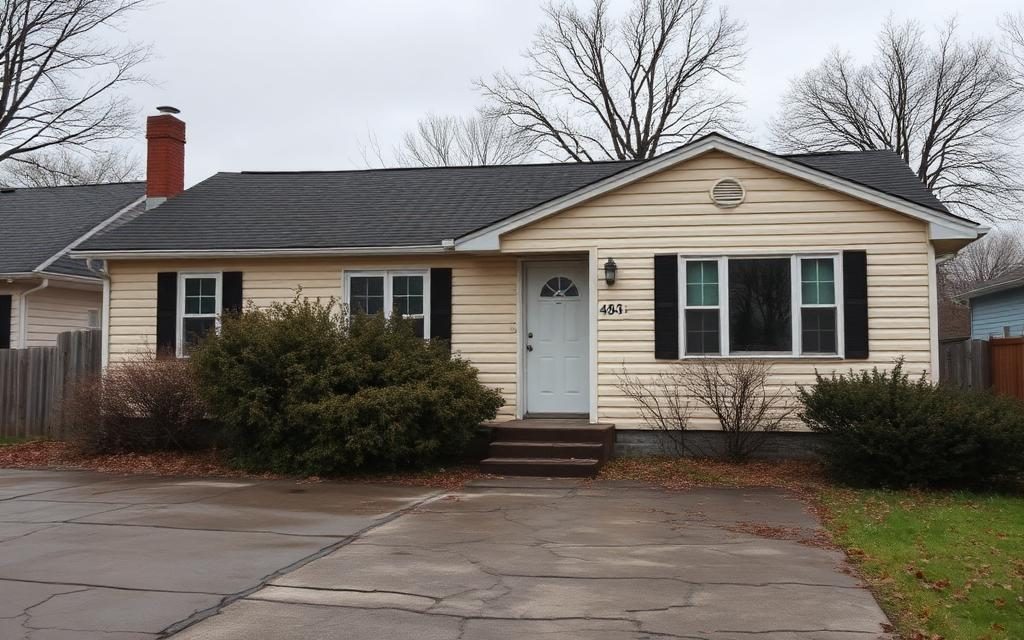
Original exterior photo, overcast sky, cars visible on the street.
Before Original exterior photo, overcast sky, cars visible on the street.
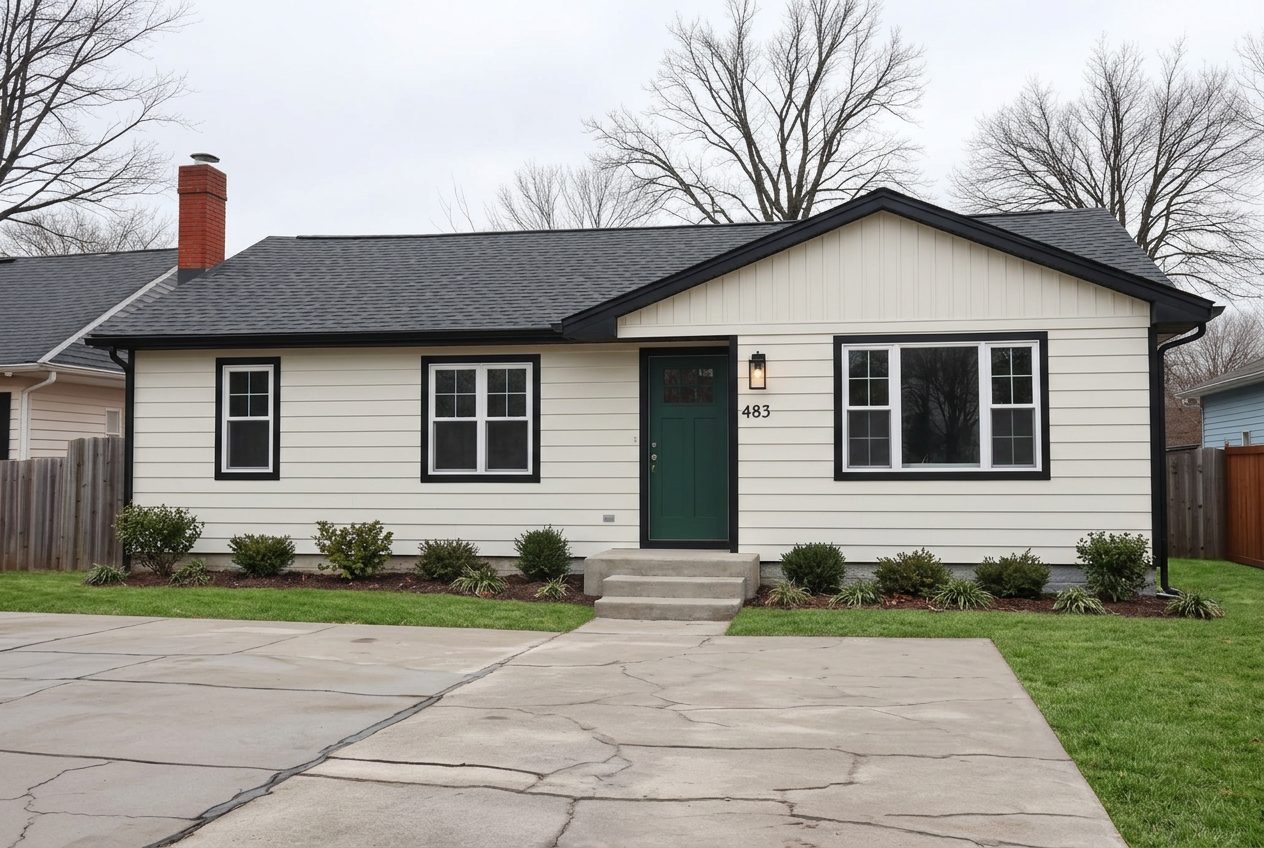
Edited exterior photo with sky replaced and vehicles removed.
After Edited exterior photo with sky replaced and vehicles removed.
How It Works

Three Steps, One Running Total.

01

Sort The Edit By Type

Decide whether the change is a correction, an enhancement, or an alteration of what the photo shows.

02

Apply Any Required Label

Attach disclosure language for edits your MLS treats as alterations rather than simple corrections.

03

Confirm Ownership Before Publishing

Check the photographer's license terms before an edited image goes to the MLS or a third party site.

Budget And Scope

Sample Per-Photo Editing Cost Table

Planning range for common exterior photo edits on a typical single family listing, medium confidence because per-photo policies vary by MLS.

Estimated Planning Range$275 to $800
Pricing ConfidenceMedium
Line ItemTradeQtyPlanning Range
Base Exterior PhotographyPhotography6 Photos$80 to $200
Sky ReplacementEditing4 Photos$20 to $60
Vehicle And Bin RemovalEditing3 Photos$15 to $45
Virtual Renovation RenderingRendering2 Photos$60 to $180
Disclosure LabelingLabeling9 Photos$0 to $40
Watermark ApplicationBranding9 Photos$0 to $25
Reshoot AllowancePhotography1 Visit$100 to $250

Typical vendor pricing for common exterior photo edits. Confirm your own MLS's current alteration policy before publishing edited images.

Enhancement Versus Alteration

Most MLS photo policies draw some version of a line between enhancement and alteration, even where the exact wording differs. Enhancement generally covers things like brightness, contrast, white balance, cropping and correcting the barrel distortion that comes out of a wide angle lens, edits that make the photo a more accurate representation of what the space looks like to the eye. Alteration generally covers changes that add, remove or move something that was or was not physically present, which is a different kind of edit entirely because it changes what the photo is evidence of.

The reason this distinction matters practically is that many boards allow enhancement without any disclosure requirement while requiring disclosure, or in some cases prohibiting outright, edits that fall on the alteration side. Where a specific edit lands on that spectrum is not always obvious, and boards do not always agree with each other, which is exactly why the safest approach is checking your specific MLS's photo policy for the edit you are considering rather than assuming a category from a general guide like this one applies uniformly.

A useful gut check is asking whether the edit changes what a buyer would see standing in the same spot as the camera. Correcting color temperature does not. Erasing a satellite dish from the roof might, depending on how your board treats exterior alterations. When in doubt, ask before publishing.

Sky Replacement And Removing Cars Or Trash Bins

Sky replacement is one of the more common edits agents ask about, since a gray overcast sky can make an otherwise strong exterior photo look flat. Many boards treat sky replacement more leniently than other alterations because the sky is not a feature of the property itself, but this is exactly the kind of assumption that needs local confirmation rather than treatment as a universal rule, since some MLS policies do restrict it as a form of alteration regardless of what it depicts.

Removing a car parked on the street or a trash bin at the curb sits in a similar category for many boards, treated as tidying up a temporary object rather than altering the property. But temporary objects can shade into something else quickly, removing a neighbor's fence, a utility box, or a permanent structure on an adjacent lot crosses from tidying into altering what the photo represents about the property and its surroundings, and that is squarely the kind of edit that needs a disclosure check against your specific MLS policy before you publish it.

  • Sky replacement: leniency varies by MLS, confirm before publishing
  • Removing a parked car or trash bin: often treated as tidying, not universal
  • Removing a permanent structure or fixture: more likely to require disclosure or be restricted
  • When uncertain, ask your MLS compliance desk before the photo goes live

Virtual Renovation Photos

A virtual renovation image, a rendering that shows a kitchen or bathroom with finishes it does not currently have, is treated by most boards as a category distinct from both enhancement and standard staging, because it depicts construction work that has not happened rather than furniture that could be moved into the room. Where boards allow this kind of image at all, it typically comes with a stronger and more explicit disclosure requirement than furniture staging does, often specifying that the rendering must be clearly labeled as a concept or a virtual renovation and not confused with the current condition of the property.

Some boards restrict virtual renovation images to marketing materials outside the MLS entirely rather than allowing them in the primary listing photo set. This is a meaningful enough difference in practice that it is worth confirming directly with your board before commissioning renderings for a listing that has not actually been renovated, rather than assuming the same disclosure that covers furniture staging will also cover a rendered kitchen remodel.

Watermarks, Branding, And Photo Ownership

Watermark and branding rules are a separate layer from disclosure rules, and many boards have specific policies restricting or prohibiting brokerage logos, contact information, or other branding overlaid on MLS photos, sometimes independent of whatever other listings in the same market do. Confirm your board's current watermark policy before adding a logo or phone number to an image headed for the MLS feed, since this is one of the more commonly enforced technical rules and one of the easier ones to get flagged for.

Photo ownership and copyright generally rest with the photographer who took the original image, not with the agent, the brokerage, or the seller, unless a specific license agreement transfers those rights. Editing a photo, whether that is staging, sky replacement, or a virtual renovation rendering, does not change who owns the underlying image, and using a photographer's work beyond the terms of the license you were given, including on a different listing or after the listing has expired, is a licensing question separate from any MLS photo rule. Check the terms of your photography agreement, not just your MLS policy, before an edited image gets reused.
Questions

Answers Before You Start.

Is Sky Replacement Allowed On MLS Photos?

It depends on the specific MLS. Some boards treat it as a minor enhancement with no disclosure needed, others restrict it. Rules vary and change over time. Confirm your current MLS photo policy before replacing a sky on a listing photo rather than assuming a general rule applies.

Can I Remove A Parked Car From An Exterior Photo?

Many boards treat removing a temporary object like a parked car or a trash bin as tidying rather than alteration, but this varies. Removing anything that could be read as a permanent feature of the property or its surroundings is more likely to require disclosure. Check with your MLS.

Do Virtual Renovation Renderings Need A Disclosure Label?

Most boards that allow virtual renovation images at all require a clear label identifying the image as a rendering or concept, not the property's current condition. Some restrict these images to marketing materials outside the MLS. Confirm your specific board's policy before commissioning renderings.

Who Owns A Listing Photo After It Has Been Edited?

Ownership typically stays with the original photographer unless a license agreement transfers it. Editing the photo, through staging, sky replacement, or rendering, does not change that ownership. Check the terms of your photography agreement before reusing an edited image beyond its original license.

Are Watermarks And Brokerage Logos Allowed On MLS Photos?

Many boards restrict or prohibit watermarks, logos, and contact information on MLS photos, and this is one of the more actively enforced technical rules. Confirm your specific MLS's current watermark and branding policy before submitting images that include any overlay.

Pricing

Pick The Plan. Keep The Number.

Annual pricing shown. One credit balance across every tool, and we meter credits, not people.

Free

$0/mo

5 credits a day, typical budget range

Start Free

Starter

$7/mo

200 credits a month, clean HD

Choose Starter
Most Popular

Pro

$10/mo

2,000 credits a month, commercial license

Choose Pro

Studio

$13/mo

4,000 credits a month, unlimited seats

Choose Studio

Edit Listing Photos With Labels Attached

Sky, staging and cosmetic edits export with the metadata and captions you need to move quickly through MLS review.

Edit A Listing Photo